Monday, November 7, 2011

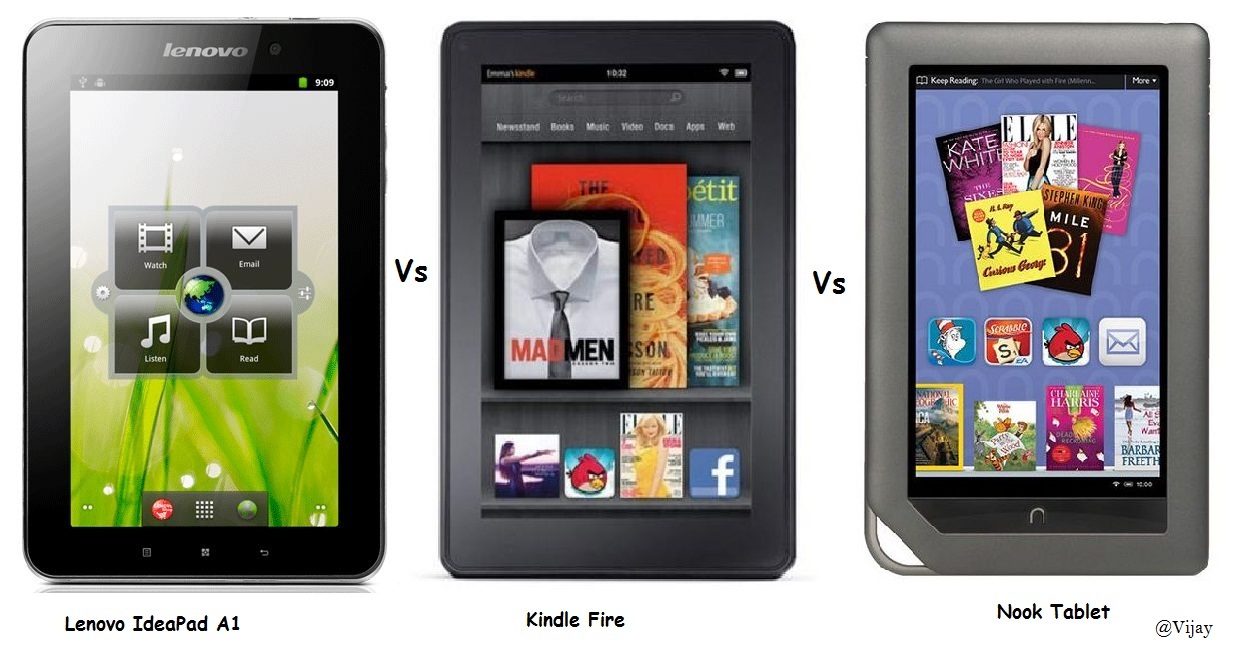
Now it's Kindle Fire Vs Lenovo IdeaPad A1 Vs Nook Tablet

Well, the competition is getting more fierce, as within two to three months of time the stupendous efforts from OEMs have resulted in announcement of three low cost affordable tablets from the most trusted brands in the tablet space.
The three major devices announced were :
  • Kindle Fire by Amazon
  • IdeaPad A1 by Lenovo
  • Nook Tablet by Barnes and Noble


Both IdeaPad A1 and Kindle Fire costs $199, while Nook tablet costs $249. From the hardware spec point of view all the three devices carry almost the same configurations with slight feature additions on some of the devices.

Operating System :
Both IdeaPad and Nook runs Android 2.3 (Gingerbread). But Kindle Fire runs on a customized Android version by Amazon.

Screen Dimension : 
All of the three devices sport 7-inch capacitive touch display, with 1024*600 resolution.
Nook, and Kindle Fire uses In Place Switching technology to support wide viewing angle.
Processor :
All of the three devices are equipped with Texas Instruments OMAP  1GHz Processor. But just the processor on IdeaPad is not duel core.
RAM :
Nook tablet hosts a powerful 1 GB of RAM, while kindle fire and IdeaPad has 512 MB of RAM.

Storage :
kindle fire - 8 GB internal, and no expandable memory.
IdeaPad and Nook -  Both have 16GB internal storage, and expandable memory upto 16 GB.

Blutooth Support :
Only Lenovo IdeaPad supports Bluetooth Version 2.1 + EDR and none of the other two tablets support any version of the bluetooth. This gives an upper hand to IdeaPad in the competition.

USB :
USB 2.0 (micro-B connector)  is available on all of these three devices.

3G :
The only feature which make these three devices take a back seat is the lack of 3G support. Basically these devices doesn't have a SIM slot at all.
Though few variants of IdeaPad has 3G support, it boosts up the price as well.

Wi-Fi :
Available on all the three devices. 802.11 standards.

I would like to stop at this point, as this is not a complete product review. I just wanted to touch upon the important hardware specs as mentioned above. These devices have marked beginning of a new era in tablet space. However this is just the beginning as the tablet business is picking up no wonder there would be other players venturing into this business.

Thursday, October 27, 2011

NOKIA's Second Innings Begins With Brilliant Windows Phones - NOKIA LUMIA

Nokia launches its most awaited windows phones during the NOKIA WORLD 2011 event held at London on 26th October 2011.
The two new windows phones from NOKIA announced with the theme “NOKIA LUMIA EASIER, FASTER, FUNNER” were NOKIA LUMIA 800, and NOKIA LUMIA 710. Both of these phones showcases a brilliant design work, LUMIA 800 looks alike N9 with a mono block and curved glass 3.7” 800*480 AMOLED capacitive display. While LUMIA 710 is being branded as “first affordable windows phone” features 3.7” TFT capacitive display.

Most importantly both of the devices are powered by 1.4 Ghz Single Core Qualcomm’s Snapdragon Processors for smooth and quick response.

NOKIA LUMIA 800


LUMIA 800 takes social networking to its next levels by intuitively integrating Facebook, Twitter, E-Mail, Chat, SMS for instant social and image sharing. And it also features Internet Explorer 9 and HTML 5 applications.


LUMIA 800 has “ NOKIA DRIVE “ as like OVI MAPS  for voice assisted navigation which is a major advantage as most of the existing nokia customers have been accustomed to OVI MAPS and would be happy to have the same maps with lot more features on windows phones.

When it comes to music, LUMIA 800 features “NOKIA MUSIC” enabling users to access over 14 million tracks divided across various catalogues based on locality. And the users have also have access to nearly 100 radio channels.

Hardware Specifications:

Networks : WCDMA 850/900/1900/2100, GSM/EDGE 850/900/1800/1900
Speed : HSDPA cat 10: 14.4 Mbps, HSUPA cat 6: 5.76 Mbps
Display : 3.7” WVGA (800x480) AMOLED capacitive touch ClearBlack display with pinch    zoom, 2.5D curved glass seamlessly integrated to unibody
OS : Windows Phone Release - Mango
Memory : 16GB internal user memory, 512MB program memory
Camera : 8Mpix auto-focus Carl Zeiss, LED flash, Video capturing MPEG-4 720p @ 30 fps
Size/Weight : 116.5 mm x 61.2 mm x 12.1 mm (LxWxT) / 76.08 cc / 142 g
Connectivity : WLAN 802.11 b/g/n, Bluetooth 2.1, A-GPS, micro-USB connector and charging, 3.5mm AHJ connector, Accelerometer, Proximity, Magnetometer, ALS
Processor : 1.4 GHz Single Core MSM8255 (WCDMA)
Audio : MP3 player, Audio jack: 3.5mm, Supported codecs: mp3, AAC, AAC+, eAAC+, m42, m4b, wma, EVRC, QCELP
Battery : 1450 mAh Music playback: up to 55 hours

NOKIA LUMIA 710


The first affordable windows phone LUMIA 710, allows the user to customize outward looks by exchanging back covers available in 5 different colors.

Like LUMIA 800, LUMIA 710 also enables social networking and instant image sharing by integrating Facebook, Twitter and Linkedin. Even LUMIA 710 supports “NOKIA DRIVE” for voice navigation and “NOKIA MUSIC” and radio channels for music and entertainment.

Hardware Specifications:
Networks : WCDMA 900/1900/2100, GSM/EDGE 850/900/1800/1900
Speed : HSDPA cat 10: 14.4 Mbps, HSUPA cat 6: 5.76 Mbps
Display : 3.7” WVGA (800x480) TFT capacitive touch ClearBlackTM display with pinch zoom
OS : Windows Phone 7.5 - Mango
Memory : 512MB RAM, 8GB storage
Camera : 5Mpix auto-focus, LED flash, Video capturing MPEG-4 720p @ 30 fps
Size/Weight : 119mm x 62.4mm x 12.5mm (LxWxT) / 81.1cc / 125.5g
Connectivity : WLAN 802.11 b/g/n, Bluetooth 2.1, A-GPS, micro-USB connector and charging, 3.5mm  AHJ connector
Processor : 1.4 GHz Single Core MSM8255 (WCDMA)
Audio : MP3 player, Audio jack: 3.5mm, Supported codecs incl.: mp3, AAC, AAC+, eAAC+, wma
Battery : 1300 mAh
 
What important features NOKIA LUMIA lacks.
NO NFC.
NO HDMI output.
NO MICROSD slot

Pricing and Schedule
LUMIA 710 is priced around 270 Euros and is expected to hit European market by early November and later in India, Hong Kong, Russia, Singapore, and Taiwan by the end of 2011.
LUMIA 800 is priced around 420 Euros and will hit the shelves of UK, France, Italy, Netherlands, Spain, Germany by early November and US market in the beginning of 2012.


Wednesday, September 21, 2011

Tap to Pair, to Share and to Pay - NFC Let's Unlock The World

In these days of technical innovations, every day a new technology is being discovered, and existing technology is more strengthened, and an old technology is shown the doors. So the most hot and happening technical innovation of these days is Near Field Communication abbreviated as NFC.

NFC might sound alien even to those people who keep themselves updated with technical advancements, and the reasons for this are many, may be NFC had a lousy start as compared to other wireless technologies like Bluetooth, IR etc. Also it took a significant amount of time in productising this technology, and lastly it takes quite a considerable amount of time in winning the faith of the people which is most important for any new invention. 

All these factors might have held back the pace of NFC but this situation is no more valid. As international standards have been agreed and published for Near Field Communication (NFC), the whole lot of service providers, content providers and OEMs are on their toes to adopt this new technology.

With this background, my intent of writing this article is to brief you on NFC technology from an end user perspective and not really getting into intricacies of this technology. So let's understand what NFC is and how this technology helps in enabling services to ensure a smoother life of mankind.

What is NFC ?
NFC is a wireless connectivity technology based on well known Radio Frequency Identification (RFID). NFC enables seamless integration of electronic devices by providing safe, simple and intuitive communication path among communicating devices.

How to establish NFC connection ?
NFC provides most intuitive way of  establishing communication path, and this is achieved through taping two NFC enabled devices. The intent behind taping is to ensure that the two communicating devices should be close to each other by maximum of four centimeters.

What happens behind the scene on taping NFC enabled devices ?
NFC is based on inductive-coupling, where loosely coupled inductive circuits share power and data over a very short range.

What is the difference between NFC enabled device and an NFC tag ?
NFC device represents an active entity, which operates in reader, writer and peer-to-peer mode.  But an NFC tag is a passive entity which just stores information which is read by NFC active devices.

What are the uses of NFC ?
The uses of NFC is categorized into three major sections which are as below.

NFC Reader/Writer Mode
This mode is used basically to read NFC tags to initiate services. The NFC tag is embedded with information in NFC data exchange format, and this data could be some text, an URL or a generic control. After extracting this data the NFC device will take appropriate actions as to display the text, open specific URL or to receive configuration information.
Here are the real time use cases of this mode.
  • NFC tags can be embedded in the posters of each monument in a museum, so that user can just tap on this poster receive some text or a URL having the complete details about the monument.
  • NFC rate tags for all the commodities available for purchase.
  • NFC tags can be used on special documents like parking permits, credit cards, and money to prove authenticity. An NFC hologram is copy-resistant and can be made invalid if it is stolen.


NFC Peer-to-Peer mode
In this mode NFC is used to enable communication between two devices to exchange data locally. If the amount of data exchanged is small it is possible to use NFC itself to exchange data as in the case of message transfer, or exchanging a business card.
But if the data to be exchanged is more, NFC just acts as a means of pairing for other wireless technologies like bluetooth or wifi and rest of the data transfer happens on the agreed wireless technology.
Below are the real time use cases of this mode.
  • To exchange photos between two NFC devices the bluetooth pairing is done with the help of NFC and actual content exchange happens through bluetooth.
  • NFC enabled bluetooth speakers or earphones can use NFC to establish initial bluetooth connection.
  • Printing images through a NFC enabled printer.


NFC Card Emulation Mode
This mode of NFC is used for payment and ticketing. The NFC device will act like an external contactless smart card. This enables contactless payments and ticketing by NFC devices without changing the existing infrastructure.
The NFC device will act like an "electronic Wallet" which replaces, credit, debit, pre-paid and any other magnetic cards which people use for transactions these days.
 Below are the real time use cases of this mode.
  • Users can pay using e-money stored on their mobile devices at parking lots, shop check-outs etc.
  • NFC devices can act like contactless virtual payment cards.


I hope through this article i have put my best offers to give a brief introduction about NFC technology and its wide range of possibilities. So when you plan to buy your next mobile or any other hand held device, ensure that the device is equipped with NFC technology.

That's all for now, " Learn to Tap .... and Tap to learn.... "

Sunday, September 11, 2011

Bluetooth Server Programming on Windows

As the world is converging under the roof of augmented reality, most of the devices around us are becoming wireless. Thanks to innovative technologies like WiFi, IR, Bluetooth, ZigBee which enable seamless interaction among various devices manufactured by thousands of vendors all around the world.

Having said that, even I have been working on a project to set up a Bluetooth server on PC which publishes few services to clients. The difficulty in programming this is purely based on selection of programming languages. Java and .Net have a well defined framework for Bluetooth programming and it is reasonably easy to use those APIs. But I planned to do it using raw Windows APIs because this helps in understanding the protocol stack well then using the built-in libraries of high level languages.

But what is significant than coding for Bluetooth is understanding Bluetooth architecture itself, and understanding those procedures to be followed in setting up a Bluetooth server or client. When I started coding for setting up a Bluetooth server, I spent most of the time in understanding these internals, and the major problem is, it was hard for me to find a proper documentation on the same on net. After consulting my colleagues who are working on Bluetooth stack for mobile devices I got a fair idea of the same and could successfully set up Bluetooth server on my PC, so I though of sharing the same with you all.

So let's get your juices going, as we begin..

I hope most of you would have some basic understanding of computer networks and network programming concepts. This is because though Bluetooth architecture was designed from the scratch, it shares lot of similarities with network programming for TCP/IP. No matter whether it is coding for Bluetooth stack or any other network architecture the basic concepts remain the same, as mentioned below.

  •     Selecting a destination device to be connected to, which sometimes involves device discovery.
  •     Agreeing on a protocol to be communicated.
  •     Making an outgoing connection or accepting an incoming connection
  •     Establishing connection for a published service on a  port specified.
  •     Sending and receiving data to be exchanged.

Here is how all the above mentioned steps are achieved in bluetooth context.
Bluetooth Protocol Stack
Bluetooth device addressing
Every Bluetooth chip produced is assigned a unique 48-bit address which is in nature is same as MAC address. This unique address is the means of addressing devices in bluetooth architecture. But the problem here is, it is  quite difficult to deal with this raw 48-bit addresses, hence the architecture allows to have user friendly names as an alias to 48-bit addresses.
Device discovery
The process of searching nearby bluetooh devices is called device discovery, and this process would take as low as 2 seconds to max of 15 seconds. A programmer may need not worry on the internals of this process as it is handled by the hardware itself.

Agreeing on a transport protocol
Once a Bluetooth client could successfully search the device which is hosting Bluetooth server. The next step is that both client application and server application need to agree upon a transport protocol to be used for further communications.
Bluetooth uses two transport protocols as mentioned below.
  • RFCOMM : This protocols provides reliable service as TCP of OSI reference model, hence there is a point to point connection established before the data  transfer. Though RFCOMM shares most of the attributes with TCP, there is a major difference with respect to the number of ports supported. TCP supports 65535 ports but RFCOMM supports only 30 ports.
  • L2CAP : If RFCOMM provides reliable service as TCP, L2CAP supports unreliable service as  like UDP. L2CAP is majorly used in the cases where reliable delivery of packets in not crucial, this helps in avoiding additional overhead of retransmissions and other monitoring requirements of TCP. To put in a nutshell this protocol supports best effort service and the significant advantage here is the level of reliability is configurable. L2CAP can publish services on all the odd numbered ports staring from 1 to 32767.

Issues with fewer number of ports for RFCOMM
In web programming the server applications will be publishing services and receiving incoming connections on the standard well known ports specified at design time for e.g. HTTP runs on port 8080. The issue with this approach is that you can't run two server applications which uses the same port simultaneously. But since due to fact that at a given time there exists large number of unused ports on TCP/IP this has not yet become an issue.

The problem with bluetooth is since only a fewer number of ports are available, it is not a right decision to assign ports at design time, however the ports can't also be assigned dynamically at run time since it can easily result in collision with only 30 ports to be choose from. Bluetooth's solution for this issue is Service Discovery Protocol [SDP].

Service Discovery Protocol
Instead of agreeing upon port numbers at design time as in TCP, Bluetooth uses publish-subscribe model which allows services to be published at run time on a chosen port. The way this is implemented is,
  • Host machine runs a SDP server on the one of the L2CAP ports.
  • All the other server applications will register to this SDP server with description of themselves and the services they provide and gets a port number assigned dynamically.
  • All the client applications trying to connect to a particular service will query SDP server and gets the information about available services and corresponding port numbers.
  • With the server address and port numbers known, client establishes connection with the intended server.
  • The data exchange begins.
Service UUID
The issue with above approach is, how do clients come to know which service that they have to connect to. The solution for this is to assign an unique identifier for each services published. and this is called Service ID or Service UUID, here UUID stands for Universally Unique Identifier.
The UUID of a service is chosen by developer at design time and this is a 128 bit ID. When a client queries SDP for a service, it uses UUID for the particular service to which it is trying to connect to.

Service Class ID
While designing Bluetooth architecture, the designers wanted to distinguish between custom applications with UUID and those classes of applications which all do the same things. To put it in simple terms if two venders provide Bluetooth servers which both provide text exchange service but with different UUID, these applications can be grouped under a unique ID which is a Service Class ID

Finally once the client gets the port number on which the service is pubished, it makes an outgoing connection which is accepted by server and then the data exchange begins.

Here is a simple program written using windows socket APIs  to setup a Bluetooth server on windows
#include "stdafx.h"
#include <WinSock2.h>
#include <ws2bth.h>
#include <bthsdpdef.h>
#include <BluetoothAPIs.h>
using namespace std;

#pragma comment(lib, "Ws2_32.lib")
#pragma comment(lib, "irprops.lib")

int _tmain(int argc, _TCHAR* argv[])
{
WORD wVersionRequested = 0x202;
WSADATA m_data;

 if (0 == WSAStartup(wVersionRequested, &m_data))
 {
    SOCKET s = socket(AF_BTH, SOCK_STREAM, BTHPROTO_RFCOMM);
    const DWORD lastError = ::GetLastError();

   if (s == INVALID_SOCKET)
   {
     printf("Failed to get bluetooth socket! %s\n",       
     GetLastErrorMessage(lastError));
            exit(1);
   }
   WSAPROTOCOL_INFO protocolInfo;
   int protocolInfoSize = sizeof(protocolInfo);

    if (0 != getsockopt(s, SOL_SOCKET, SO_PROTOCOL_INFO, (char*)&protocolInfo, &protocolInfoSize))
    {
      exit(1);
    }
   SOCKADDR_BTH address;
   address.addressFamily = AF_BTH;
   address.btAddr = 0;
   address.serviceClassId = GUID_NULL;
   address.port = BT_PORT_ANY;
   sockaddr *pAddr = (sockaddr*)&address;

   if (0 != bind(s, pAddr, sizeof(SOCKADDR_BTH)))
   {
      printf("%s\n", GetLastErrorMessage(GetLastError()));
   }
   else
   {
      printf("\nBinding Successful....\n");
      int length = sizeof(SOCKADDR_BTH) ;
      getsockname(s,(sockaddr*)&address,&length);
      wprintf (L"Local Bluetooth device is %04x%08x \nServer channel = %d\n", GET_NAP(address.btAddr), GET_SAP(address.btAddr), address.port);
   }

        int size = sizeof(SOCKADDR_BTH);
        if (0 != getsockname(s, pAddr, &size))
        {
            printf("%s\n", GetLastErrorMessage(GetLastError()));
        }
        if (0 != listen(s, 10))
        {
            printf("%s\n", GetLastErrorMessage(GetLastError()));
        }

        WSAQUERYSET service;
        memset(&service, 0, sizeof(service));
        service.dwSize = sizeof(service);
        service.lpszServiceInstanceName = _T("Accelerometer Data...");
        service.lpszComment = _T("Pushing data to PC");

        GUID serviceID = OBEXFileTransferServiceClass_UUID;

        service.lpServiceClassId = &serviceID;
        service.dwNumberOfCsAddrs = 1;
        service.dwNameSpace = NS_BTH;

        CSADDR_INFO csAddr;
        memset(&csAddr, 0, sizeof(csAddr));
        csAddr.LocalAddr.iSockaddrLength = sizeof(SOCKADDR_BTH);
        csAddr.LocalAddr.lpSockaddr = pAddr;
        csAddr.iSocketType = SOCK_STREAM;
        csAddr.iProtocol = BTHPROTO_RFCOMM;
        service.lpcsaBuffer = &csAddr;

        if (0 != WSASetService(&service, RNRSERVICE_REGISTER, 0))
        {
            printf("Service registration failed....");
            printf("%d\n", GetLastErrorMessage(GetLastError()));
        }
        else
        {    
            printf("\nService registration Successful....\n");
        }
        printf("\nBefore accept.........");
        SOCKADDR_BTH sab2;
        int ilen = sizeof(sab2);
        SOCKET s2 = accept (s,(sockaddr*)&sab2, &ilen);
        if (s2 == INVALID_SOCKET)
        {
         wprintf (L"Socket bind, error %d\n", WSAGetLastError ());
        }
        wprintf (L"\nConnection came from %04x%08x to channel %d\n",
        GET_NAP(sab2.btAddr), GET_SAP(sab2.btAddr), sab2.port);
        wprintf (L"\nAfter Accept\n");
 
        char buffer[1024] = {0}; 
        memset(buffer, 0, sizeof(buffer));
        int r = recv(s2,(char*)buffer, sizeof(buffer), 0);
        printf("%s\n",buffer);

         closesocket(s2);
        if (0 != WSASetService(&service, RNRSERVICE_DELETE, 0))
        {
            printf("%s\n", GetLastErrorMessage(GetLastError()));
        }
        closesocket(s);
        WSACleanup();
    }

Thursday, August 25, 2011

An Early bird's view of Windows 8 "Metro UI"

Microsoft is formally making it's pitch to sustain and continue to hold the commendable position in the world of operating systems. In this efforts MS has recently announced it's revolutionized, most discussed, and would be most debatable Metro UI for windows 8 operating system.
 Just a day or two before this article was published, Microsoft has been granted patent for it's "Metro UI" from US patent and trademark office, and this patent was filed under the name 'Visual motion for user interface feedback'. 

What made Microsoft to invent "Metro UI" ?
Windows 8 derived this idea of  Metro UI from it's most popular "Windows phone 7" UI. As Microsoft burnt its figures with windows CE phones, since these phones failed to cater to user expectations in many areas, Microsoft really had to bring in radical changes and innovative features into its next generation of phones to stay in the competition and live up it's reputation. "Metro UI " is one of the biggest change that the designers at Microsoft stressed for.

Why is it even called "Metro UI" ?
There is an interesting story behind this. The designers at Microsoft were working hard to find out what makes humans to perceive  things quickly and easily. and  as research went on they found  that people showed capabilities to perceive Sign board, Warning boards, Information board displayed at Metro stations and many other public place.
Microsoft decided to milk out this idea, and redesigned windows phone UI as sign boards displayed at metro stations and named it as "Metro UI"

A sneak peek of Windows 8 Metro UI ...
Microsoft has re-engineered it's conventional desktop UI to bring in home screen concept in windows-8. This is a significant change when compared to all old versions of windows UI, however this Metro UI may doesn't seem to be a big change for windows phone 7 users as windows 8 UI is inline with windows phone 7 UI. Now Microsoft has decided to introduce this unique UI across all gadgets like Phones, Tabs, Desktops, Laptops etc..

As most of you all might be knowing Microsoft is expected to release windows 8 during Fall 2012, though beta releases are made available for selected OEMs there has been no official beta builds available for public . But few companies and geeks (rainmeter and omnino) are successful in emulating windows 8 metro UI on windows 7  and below are the few glimpses.

Home Screen :

  • Home screen is a unified central location providing quick access to apps, file system, multimedia utilities, E-mail clients, browser, HTML 5 and Java script based web apps and many more.
  • Home screen is all set to replace decades old  windows start menu.
 
Live Tiles :

  •  Home screen is customizable by adding live tiles which will be replacing static icons.
  • A live tile can be created for each of the application that you would like to have a quick access to
  • Live tiles are highly customizable like gadgets on windows 7.
  • These live tiles just not being acting as access points for applications but they also provide a summarised view of application content.
  • Live tiles are dynamic and they get updated with most recent application content.

Other Significant Changes :
  • Smooth switching between running apps .
  • Anchor and re-size apps to the sides of the screen to leverage true multitasking.
  • Touch optimised IE 10 with improved browser  engine.
  • Thousands of HTML5 and Java based web apps.
  • And many more undisclosed feature.

Most of us are hooked to a fact that "Seeing is believing" ,and from all the specs that Microsoft has made available for public, I'm sure that MS will emerge as a winner with this innovative UI. As Bill Gates always said "Passion and Innovation" are the key factor driving their business, and it looks this apatite for innovation has paid off.

After all we need "Change".. So looking forward to you Windows 8 :-)

Friday, August 12, 2011

Let me guess What You Like the most - Recommender Systems...

Have you ever wondered how a news paper site always displayed news of your interest. 
How google serves you with appropriate information that you are looking for. 
How Youtube lists out videos of your likings. 
How amazon computed your buying pattern.

Interesting right ?... Yes there is someone sitting behind the scene and reading your mind, constantly learning about your interests, quickly making best decisions about your likings, running complex algorithms  and performing thousands of computations to derive your web browsing behavior. 

So who is doing all these,  behind the scene ?
"Recommender Systems" a huge and most complex systems striving hard to serve user with the "Most appropriate " content in an automated fashion. These are the systems responsible for understanding user interests and behavior and presents them with the contents in line with their expectations. 

How does Recommender System work ? 
The functioning of recommender systems varies based on the business where they are deployed in,  but most of these systems run intelligent algorithms to extract the most appropriate contents from a large set of options available. These intelligent algorithms are not static, but they are constantly modified based on user responses for the contents presented.
Few of these recommender systems starts from nothing and gets going with constantly learning about user interests over a period of time and based on this data, it decides on the contents to be presented further.
Like this different recommender systems uses different techniques to arrive at best choice of contents.

Let's understand these algorithms by solving a real time problem. 

Problem Statement :
You being the editor of  "Yahoo" home page, your responsibility is to choose "5" articles out of  "30" available articles to be put on Yahoo India home page.


Why this issue is hard to resolve ?
Yes, this is really a complex problem, because the problem itself is very subjective. it's hard to derive at an algorithm which always returns the best predictions for all set of users. An algorithm which predicts extremely well for few set of users may turn out to be the worst algorithm for other set of people.
This is because the interests of people change from person to person,  person 'A' likes sports news, person 'B' likes news about politics, person 'C' is a stock broker, person 'C' always looks for news from Hollywood, like this the tastes and interests of the people are subjective and tend to change even based on geography.

Solution:
Here I'll try to explain solution for the above mentioned problem in simple terms, using two algorithms, one of them is a simple algorithms which is not very effective and the other one a highly effective algorithm based on probability which is currently being used by many news agencies.

Algorithm 1 - Predictions based on user groups.
This is a very simple algorithm which uses the following principle.

1) Create multiple geographical areas.
2) Consider a particular geographical area and predict interests of people in that locality .
3) Come up with different segments based on predictions.
4) The segments could be Sports, Politics, Cinema, Education, Science, Technology.
5) Now assign users to these different segments based on predictions.
6) At a given time assign all the available articles from different categories to different segments.
7) The article assigned to a segment which has highest number users gets first priority.
8) Article assigned to a segment which has next highest number of users gets second priority. Like this priorities of articles are decided.
9) Hence the algorithm arrives at ranking of all the available articles.
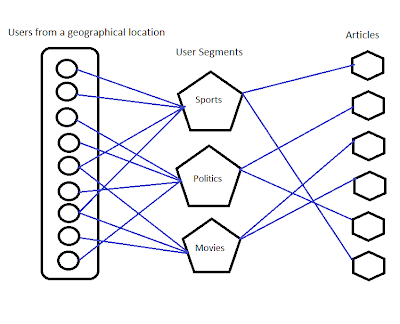
Predictions based on user groups
Algorithm 2 - Random Bucket Algorithm
This is the most efficient algorithm used in many recommender systems. This algorithm was invented by Charles Pierce a physicist in the year 1877.
The algorithm works based on true randomization, and this randomization completely removes bias, which means no article is presented subjectively inline with interests of a particular group of users, but Instead all the articles are presented randomly to a group of users who are also selected randomly.

Finally based on the users feedback of liking or disliking of the article, probability is found-out for each articles. The article with the highest probability gets first priority and the next article with the highest probability gets second priority and so on.

Let me explain this with a simple example. Say our goal is to find-out whether people like Coke most or Pepsi most, here is the trick.

1)  Randomly choose 10 people.
2)  Randomly distribute Coke or Pepsi to each one of them.
3)  Say 5 people got coke and 3 of them like it.
4)  And, say 5 people got Pepsi and only 1 of them likes it.

Which means the probability of people liking coke is more than the probability of people liking Pepsi.
Hence the conclusion is most of the people like Pepsi than Coke, This algorithm though looks simple is very complicated and proven to be most effective under all circumstances.

That's all, I hope you have got a brief introduction about the most challenging yet interesting research area "Recommender Systems". Most of the search engine companies, news and online shopping giants shell out a lot of money and significant amount of time on this research area with an intent of building the best recommender systems which gives out huge customer base in return.

If you are further interested to dig deeper into this topic.... Just Google it.. May be the best " Recommender System " will get you the most appropriate information.... :-)

Tuesday, July 19, 2011

Wherever you are, live happily.

Dear friends, I'm not writing this to share my condolences, or to say we miss you Vamshi because nothing on this earth can compensate for this loss. Person like Vamshi is hard to find and god showed that  it is even harder to have their presence here for long time , Vamshi is one in a million.

We all thought he was a  friend, brother, teacher, colleague.. but no I don't think so, he was just here to play his role and now it is that he has already said good bye, may be somewhere, something else is waiting for his arrival, who are we to stop ?

But being here he showed us the value of  love, friendship, caring, brotherly-hood and what not, he has set an example of how one should live a life filled with values. Because when you die you deserve nothing but just those few drops of tears from your loved ones, and you Vamshi , you deserved an ocean of it my dear.

In his 26 years Vamshi has not been heated by anyone, has not even wished bad for others, stood strong against all the odds, achieved greatest heights and won all of our hearts.

Here is a video of Vamshi spending some happy movements with his  friends Arun,Vinay, Madhava, Raghunandan,Ujwala and others..


And few sweet memories.


Friends I don't believe in superstitions, but the day when Vamshi and his friend Pradeep got carried away by water stream and as the rescue operations started hoping to find them alive, the same evening and at the same place there " Appeared two rainbows one beside the other " . They said " Don't look for us , good bye ".


Pradeep I feel really sad for you brother, May god give all of the strengths to your parents to bear your absence. We miss you.

Vamshi might have disappeared from us physically, but he lives in our hearts forever. We are sure that he will come back soon in some form and lives among us... But still.... we miss you a lot dear, may the great soul rest in peace.

ShareThis